
AndChat (Donate)1.4.3.2 - Get APK
You'll be able to download in few seconds.
Publisher Description
****** This app is no longer being updated ******
Apologies for the crashing with the recent update. I forgot to update a config file and an essential file was stripped out >.<
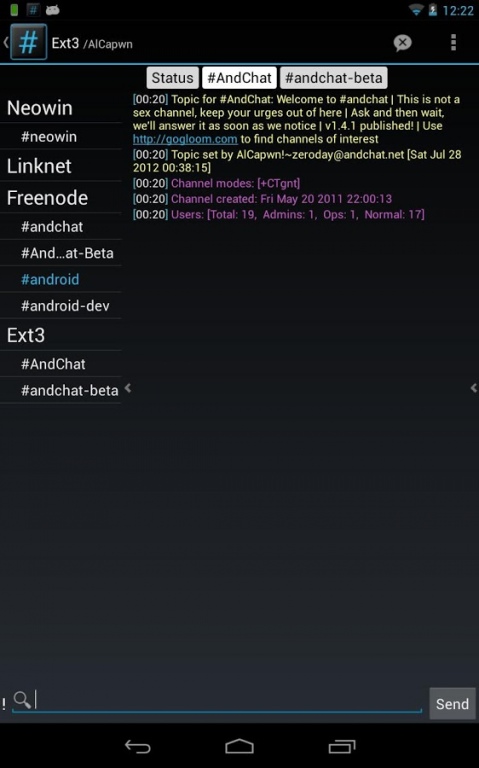
This is the donate version of AndChat, the multi-server internet relay chat (irc) app for Android, designed to work on both phones and tablets, and includes a tablet optimized layout.
Official irc channel: irc.ext3.net, #andchat
If you're coming from the Free version, use the Data Backup option (Settings->Data Backup) to import your data over.
I can't respond to comments so contact me with any issues/bugs/feedback:
Web: groups.google.com/group/andchat
Twitter: twitter.com/andchat
Email: contact@andchat.net
Latest change log available at http://min.ie/2rk.
Nick completion is done via search button or pressing the search icon next to the input box.
Features:
Quick channel switcher (Android 3.0+)
Ignore list
Multi-Server support
Multi-Charset support
SASL Support
UTF-8 Detection
Chat Logs
Typing history (DPAD up/down)
Timestamps
Nick highlight support for multiple nicknames
Notifications
SSL Support
User list
Encryption to protect access to password protected servers
About AndChat (Donate)
The company that develops AndChat (Donate) is Al. R.. The latest version released by its developer is 1.4.3.2.
To install AndChat (Donate) on your Android device, just click the green Continue To App button above to start the installation process. The app is listed on our website since 2013-04-08 and was downloaded 0 times. We have already checked if the download link is safe, however for your own protection we recommend that you scan the downloaded app with your antivirus. Your antivirus may detect the AndChat (Donate) as malware as malware if the download link to net.andchat.donate is broken.
How to install AndChat (Donate) on your Android device:
- Click on the Continue To App button on our website. This will redirect you to Google Play.
- Once the AndChat (Donate) is shown in the Google Play listing of your Android device, you can start its download and installation. Tap on the Install button located below the search bar and to the right of the app icon.
- A pop-up window with the permissions required by AndChat (Donate) will be shown. Click on Accept to continue the process.
- AndChat (Donate) will be downloaded onto your device, displaying a progress. Once the download completes, the installation will start and you'll get a notification after the installation is finished.
Program Details
System requirements
Download information
Pricing
Version History
version 1.4.3.2
posted on 2013-04-08
v1.4.3.2,Avoid crashing the entire app when message parsing fails,Avoid using UI thread for network operations,Fix notification light not being activated,Fix messages not updating after turning screen on,Fix for crash when using /mode on a channel not joined to,If you previously set up a server to use SASL, you will have to update the server details and add the SASL details to the dedicated authentication options screen.,See http://www.andchat.net/changelog.txt for full list of changes
version 1.3.5
posted on 2011-03-06
Several fixes and updates
Disclaimer
External Download
We do not host AndChat (Donate) on our servers. We did not scan it for viruses, adware, spyware or other type of malware. This app is hosted by Galad and passed their terms and conditions to be listed there. We recommend caution when installing it.
The APK Download link for AndChat (Donate) is provided to you by apps112.com without any warranties, representations or guarantees of any kind, so access it at your own risk.
If you have questions regarding this particular app contact the publisher directly. For questions about the functionalities of apps112.com contact us.
